If you’re actively looking for secure, modern storage in Leicester, you’re probably not comparing “units” so much as comparing how easy and safe the whole experience feels. People searching online usually want three things: simple sign-up, reliable security, and access that works when real life happens — evenings, weekends, and last-minute changes.
If you’re searching self storage near me and weighing self storage Leicester options, you’ll likely also see self storage in Leicester results that look similar on the surface, alongside storage near me listings that still rely on a padlock and a physical key. Smartbox Self Storage is built around a different model: at our Leicester self storage facility, the app controls the site gate, the roller shutter door and your unit access, so the journey from booking to moving in is designed to happen without key handovers or reception-hour bottlenecks.
Across the UK, modern storage facilities are increasingly adopting digital access systems and automation. The point is to reduce friction: fewer lost keys, better control over who can enter, and faster move-ins when time matters.
Why Digital Access Is Changing Self Storage in Leicester
Digital access is changing the category because it fixes the two pain points that cause most complaints in storage: access and control. Traditional storage can be secure, but it often depends on physical keys, key sharing, and office-hour processes. Digital systems shift those weak points into controlled permissions and app-led entry.
In Leicester, the value of this shift is local and practical. Customers in Clarendon Park often need short, frequent visits and don’t want storage to become a planned expedition. People travelling in from Oadby or Evington tend to value predictable access that fits around commuting and school runs. For customers coming from Wigston or Braunstone, the sticking point is often timing — the ability to access late or early without having to time it around a staffed desk.
Compared to other self storage Leicester providers, Smartbox is unusual because the technology isn’t just “a lock”. It’s a full access journey: digital booking, app-controlled entry, and 24/7 on-site use built in from the start.
What Is the Smartbox Digital Lock App?
The Smartbox digital lock app is the tool that runs your access at the Leicester facility. Instead of carrying keys or using a padlock, your phone becomes the access method across three points: the site gate, the roller shutter door, and your unit.
That matters because it changes what “secure storage” means in day-to-day use. Traditional padlock-based storage relies on a physical key that can be lost, copied, or shared informally. Digital systems rely on permissions. In practice, that means you can control access without circulating keys, and you can keep access aligned with who genuinely needs it.
For customers looking for secure storage in Oadby or Wigston, the benefit is not the novelty of using an app. It’s the removal of common failure points: no lost keys, fewer “I can’t get in because the office is shut” moments, and a clearer way to manage shared access.
How to Set Up the App Before Your First Visit
If you can, set up before you arrive. Most problems with digital access aren’t “technical”; they’re practical: an incomplete sign-up, a phone set to extreme battery saving, or a flat battery after a long day.
Before heading to Smartbox Self Storage Leicester, make sure your booking details match what you’ll use on site.
Use the same phone number and email address you used during checkout, because your access permissions are tied to your account. If your phone restricts Bluetooth or background activity to save battery, relax those settings while you’re using the app, because short-range connections are part of how many smart access systems operate at the unit door.
If you’re travelling in from Braunstone or Wigston, it’s worth opening the app at home first and confirming you can log in. It’s a thirty-second check that avoids the worst version of arrival: standing at the gate trying to reset passwords under pressure.
Treat your phone like your key. Charge it, and if you’re coming straight from work in Oadby or Evington, keep a cable or power bank with you. Keyless access removes friction, but it assumes you have power.
How to Access the Leicester Facility Using the App
At our Leicester self storage facility, the app is designed to replace the typical “reception-first” flow. When you arrive, you use the app to operate the site gate. That’s the first moment customers notice the difference: entry is tied to your permissions, not to somebody being at a desk.
Once you’re inside, the same app-led approach can operate the roller shutter door where applicable. This matters more than it sounds. At older sites, customers often juggle separate access methods — keys, fobs, gate codes, and a padlock — and the process becomes slower the more tired you are. Here, the access journey is intended to stay consistent from gate to unit.
For customers coming from Clarendon Park, this tends to make short visits easier because you can get in and out quickly. For customers driving in from Wigston or Braunstone, it reduces the risk of arriving late and discovering your move-in depends on office hours.
How to Unlock Your Storage Unit
Unlocking your unit is where the padlock comparison becomes real. Traditional storage relies on you supplying a lock, keeping track of keys, and hoping nobody else still has a copy months later.
Digital access flips that: you unlock via the app, and access is controlled by permissions.
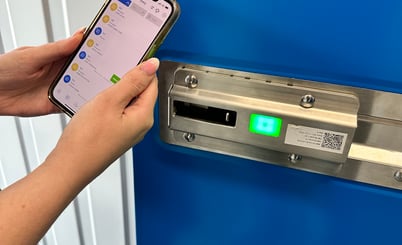
On site, you’ll open the app and follow the unlock prompt at your unit. Many smart lock setups use a short-range connection between your phone and the lock, which is why Bluetooth and phone settings matter. Some locks also use a simple “activate” step on the front of the lock before you unlock in the app, which helps if you arrive with hands full.
Where activity logs are enabled, you also get accountability. Instead of relying on memory, the system can show access history. That’s useful for households sharing a unit between Oadby and the city centre, and it’s even more useful for small businesses storing stock or tools, where you want clarity over when the unit was accessed.
A practical Leicester tip: open the app and get the unlock screen ready before you start carrying items. That one habit is what makes keyless access feel genuinely faster, not just different.
Sharing Access With Family or Team Members
Sharing a key sounds simple until it isn’t. It starts as a favour — a partner, a friend helping with a move, an employee collecting stock — and then the key remains “out there”. Padlock systems aren’t built for tidy access management.
Digital access is. Instead of handing out keys, you grant permission and remove it later if circumstances change. The advantage is control: shared access doesn’t have to become permanent access. If you’re a household customer in Evington sharing a unit with family, this keeps access simple without creating spare keys. If you run a small business and use storage as operational space, it means access can track roles rather than whoever happens to have a key.
Compared to other local storage providers, this is where app-led storage usually feels most “modern” in practice: it handles real-life complexity without turning it into admin.
What Happens If You Lose Internet Connection?
This is the right question to ask, because reliability matters more than features. In practice, there are two separate issues: losing mobile signal, and losing the ability to use your phone at all.
Many modern systems are designed so that if mobile data drops, access can still work using your smart device, with activity information syncing once connectivity returns. The practical takeaway is that “low signal” should not automatically mean “no access”, provided your app is set up and you can use the device normally.
A dead battery is different. If your phone dies completely, you’ve lost your “key”. If you’re travelling in late from Wigston or Braunstone, keep a cable in the car. If you’re coming from Clarendon Park on foot, a small power bank can save a wasted trip.
Why Smartbox Leicester Uses Keyless Digital Security
Smartbox in Leicester is designed around a clear view of what customers actually want: remove the small frictions that make storage annoying, while improving control and security. Keyless entry supports both.
Unlike traditional padlock-based storage, keyless systems remove the lost-key problem entirely and reduce the risks that come from copied or circulating keys. They also support controlled access, which matters for shared households and business users. Where activity logs are enabled, they add accountability, because access events are recorded rather than guessed at.
Smartbox’s security posture also isn’t only about the lock. You’ve described multiple layers on site: secure perimeter and gate control, AI-enabled CCTV connected to a monitoring station 24/7, and PIR-triggered lighting across the site and facility. That layered approach matters because it treats security as a system, not a single feature.
Put bluntly, the tech is there to make the customer journey feel modern and predictable — not to create complexity.
How Automation Enables Move-Ins Within Minutes
This is one of the clearest ways Smartbox differs from the typical Leicester storage experience. Customers can drive up to the gate, scan a QR code, book and pay for the unit they need on a mobile-optimised journey, download the app, and receive their access details. From there, the same app can operate the gate, the roller shutter door and the unit access so customers can move in any time, day or night, with 24/7 access.
The missing piece in many “self-serve” systems is support. Smartbox adds a 24/7 AI assistant called Max to help customers when questions come up outside normal hours — from booking queries to access guidance — so the experience doesn’t collapse at 8pm. This kind of always-on, multi-channel AI support is becoming more common in modern self storage operations because it reduces missed enquiries and helps customers complete bookings without waiting for staff.
For customers in Oadby, Wigston, Clarendon Park, Evington or Braunstone, the practical benefit is simple: storage can start when you’re ready to move items, not when a reception desk is open.